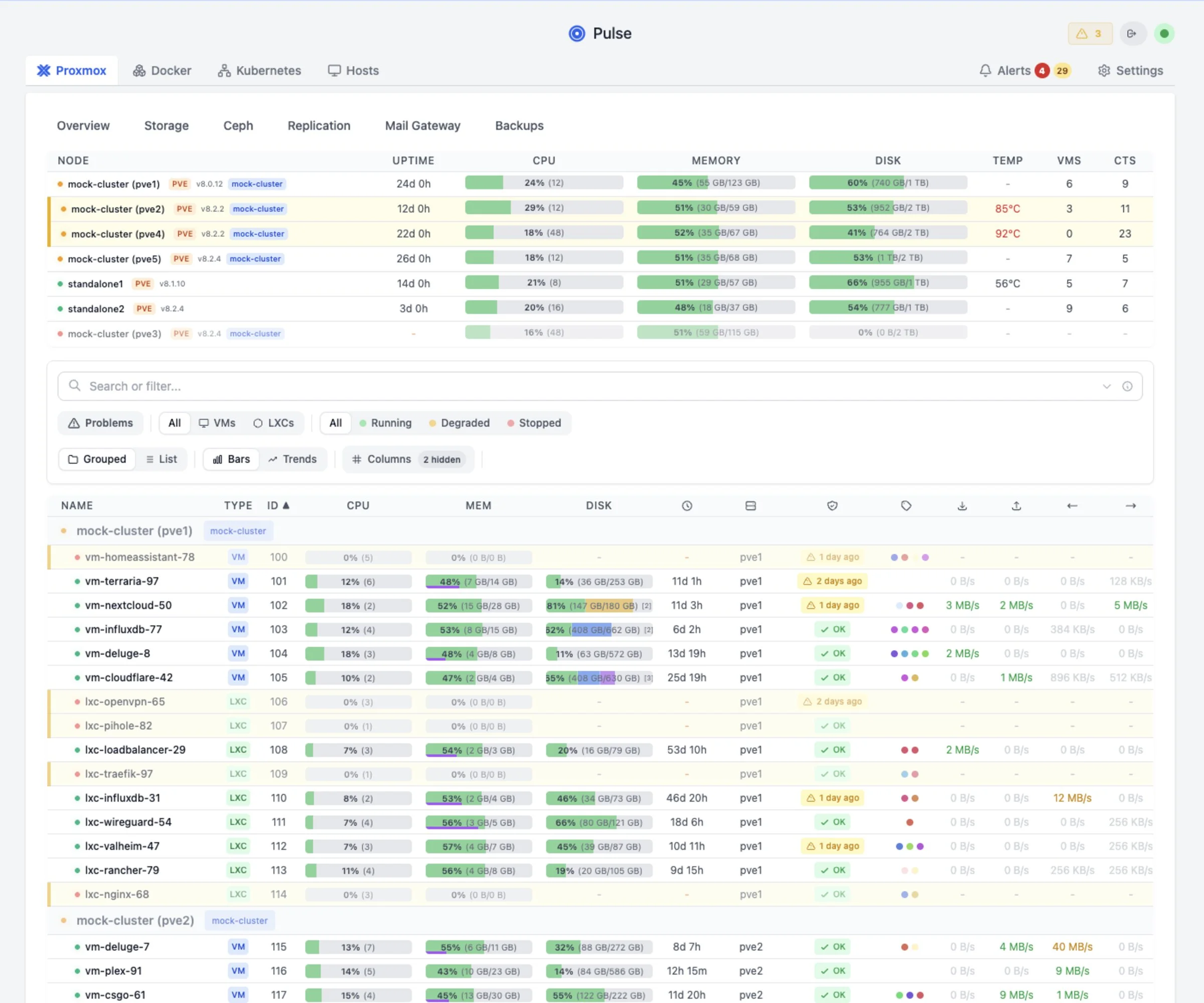
The sysadmin that watches your infrastructure 24/7
from anywhere.

Pulse Patrol runs secure background health checks across Proxmox, Docker, and Kubernetes. Pair it with Pulse Relay for privacy-first remote access foundations.

Join thousands of sysadmins
Self-hosted
Privacy-first
Bring your own AI
Native support for
Proxmox VE
Docker
Kubernetes
Ceph
ZFS
Pulse dashboard
Pulse Patrol finding · Just now
Warning
Backup job "pbs-daily" failing
Last 3 runs failed with "connection refused". PBS at 192.168.1.50 may be unreachable.

Dashboards look cool.
But they don't fix things.

You have Grafana graphs and Zabbix alerts. But do you actually look at them? Most homelab outages happen because "alerts were noisy" or "I didn't check the dashboard."

Pulse is different. It doesn't just graph CPU usage. It analyzes why CPU is high, connects it to that failing backup job, and tells you the root cause in plain English.

Traditional Monitoring
⚠️ CPU > 90% (Node pve1)
⚠️ IO Delay > 10% (Node pve1)
⚠️ Backup Job failed
...and 20 more emails
Pulse Patrol
Root Cause Identified
"Backup job stalled causing high IO delay. CPU wait is high. Kill the stuck backup process."
What Pulse Patrol Catches

Real issues from real clusters

These aren't hypotheticals. These are real findings from production homelabs running Pulse.

💾
ZFS pool "tank" 94% full

At current growth rate, pool will be full in 3 days. ZFS performance degrades significantly above 80%.

→ Run `zfs list -o space`
🔄
VM 105 restarting loop

6 unexpected reboots in the last 24 hours. Memory usage spikes to 98% before each restart.

→ Check memory allocation
📦
Backup job silent fail

"nightly-backup" last succeeded on Dec 18. VM 102 (postgres) has no recent protection.

→ Check PBS storage
🖥️
Node clock drift

System time is 47s behind cluster. Can cause ceph issues and VM migration failures.

→ Check NTP sync
🐳
Stalled Container

Container "plex" running but failing health checks on port 32400 for > 2 hours.

→ Check app logs
⚙️
Config Drift

Network config differs on node pve3. vmbr0 MTU is 1500 vs 9000 on other nodes.

→ Fix MTU mismatch
★★★★★ Featured Review

"Pulse is by far the best way to monitor my Proxmox hosts in a single dashboard. No overwhelming metrics — just what you need."

— r/selfhosted community member
Get Started →
# Pulse Patrol runs automatically $[17:35:02] Starting patrol run... [17:35:02] Analyzing 3 nodes, 24 VMs [17:35:04] Scanning logs, metrics... [17:35:07] Patrol complete: 2 warnings, 1 critical
[CRITICAL] ZFS pool at 94% [WARNING] Backup job failed [WARNING] VM 105 memory pressure
Pulse — Pro: Auto-Fix
Pulse Patrol findings (BYOK)
Why This Isn't Just Another Chatbot

Your infrastructure, not just a chat window

When you ask ChatGPT about your server, you have to describe everything manually. Patrol sees your entire infrastructure at once — with historical context no generic LLM can access.

📊 Full Infrastructure State
  • Proxmox nodes, VMs, containers
  • Docker/Podman hosts & containers
  • Kubernetes pods, deployments, services
  • PBS/PMG backup status & jobs
  • Ceph clusters & OSD health
  • ZFS pools & storage usage
📈 Historical Intelligence
  • 24h & 7d trends — rising, stable, volatile
  • Learned baselines — what's normal for your env
  • Capacity predictions — "full in X days"
  • Anomaly detection — z-score deviations
  • Change tracking — config drift, migrations
  • Incident memory — past investigations
🧠 Operational Memory
  • Your notes — "runs hot for transcoding"
  • Dismissed alerts — won't nag again
  • Past remediations — what fixed it before
  • Resource correlations — cross-host patterns
  • User feedback — learns from your input
  • Suppression rules — expected behavior

This is what makes Patrol catch issues that static alerts miss.

It's not just "CPU > 90%". It's "CPU spiked to 85% but that's normal for this VM during backups, however the backup hasn't completed in 3 hours which is unusual."

Pro Exclusive

The 3am problem, solved

Traditional alerts wake you up with noise. Pro wakes you up with answers.

Traditional monitoring · 3:14 AM
⚠️ ALERT: CPU > 90%
⚠️ ALERT: Memory > 85%
⚠️ ALERT: IO Wait > 20%
...and 12 more
"Great, everything is on fire. Where do I even start?"
Pro Alert Analysis · 3:14 AM
Root Cause: Runaway backup process
PBS backup job for VM 102 (postgres) is stuck in a write loop, consuming 94% CPU and causing IO saturation. All other alerts are symptoms.
→ One root cause, not 15 alerts
Skip the 20-minute triage. Start fixing immediately.
Pulse uses AI to analyze every alert the moment it fires — so you don't have to correlate logs at 3am.
Pro Exclusive

Pulse that fixes, not just reports

Patrol doesn't just find problems — it can fix them too. With your approval, Pulse Assistant executes safe remediation commands on connected hosts.

🤖
Pulse Assistant
Investigating patrol finding
I found a stuck backup process on pve1. The PBS task UPID:pve1:00003A2F has been running for 6+ hours with no progress.
Recommended action: Kill the stuck task to free resources.
PROPOSED FIX
pvesh delete /nodes/pve1/tasks/UPID:pve1:00003A2F
Fix applied successfully
Task terminated. CPU usage returning to normal.
🛡️ Commands require explicit approval. You stay in control.
Unified Agent

One agent. Every platform.

Install once, monitor everything. The agent auto-detects Docker, Kubernetes, and Proxmox — no manual configuration.

🔍
Auto-Detection

Detects Docker, Podman, Kubernetes, and Proxmox automatically

🔄
Auto-Updates

Agent updates itself when new versions are released

📦
Single Binary

One install command. Works on Linux, macOS, and Synology

🛡️
Pulse Commands

Let Pulse run diagnostics and fixes on connected hosts

# Install on any host - Docker, K8s, Proxmox auto-detected $ curl -fsSL http://pulse:7655/install.sh | bash -s -- --token <token>
[install] Detecting platforms... [install] Found: Docker ✓ Kubernetes ✓ Host metrics ✓ [install] Installing pulse-agent to /usr/local/bin/ [install] Creating systemd service... [install] ✓ Agent connected to Pulse
For Teams

Built for production environments

Running Pulse for a team or business? Pro (and Cloud) include compliance and collaboration features out of the box.

📋
Audit Logging

Tamper-proof logs with HMAC signing. Stream to your SIEM via webhooks. Configurable retention.

👥
Role-Based Access

Define roles and permissions. Control who can view, modify, or execute commands across your infrastructure.

🔐
SSO & SAML

OIDC and SAML support. Connect to Okta, Azure AD, Google Workspace. Map roles automatically.

📊
Infrastructure Reports

Generate PDF/CSV reports. Capacity trends, resource usage, patrol history. Share with stakeholders.

Setup

Up and running in minutes

1

Deploy Pulse

Docker or LXC. Add your Proxmox API credentials.

docker run -d pulse
2

Add your AI key

OpenAI, Anthropic, or local Ollama. Your choice, your data.

Settings → Pulse Assistant → Add Key
3

Pulse Patrol starts

Automated scanning on your schedule. Findings appear in Dash.

🟢 Watching
Pricing

Self-Hosted Plans

Start free, or upgrade for remote access, AI investigations, and team controls.

Annual Save ~31% Monthly
Community

Community

Free
Forever · self-hosted · open source
  • Up to 5 agents
  • Unlimited containers & VMs
  • 7-day metric history
  • Real-time monitoring dashboard
  • Threshold-based alerts
  • Pulse Patrol (BYOK or 25 free)
  • Pulse Assistant (BYOK)
  • Docker & Kubernetes monitoring
  • Basic SSO (OIDC)
  • Update alerts (container/package)
Get Started
Relay

Relay

$49/yr
Save 18%
  • Up to 8 agents
  • Unlimited containers & VMs
  • 14-day metric history
  • Pulse Relay (secure remote access)
  • Mobile app access
  • Push notifications
  • Everything in Community
Buy Relay
Pro ★

Pro

$99/yr
Save ~31% — 2 months free
  • Up to 15 agents
  • Unlimited containers & VMs
  • 90-day metric history
  • AI Auto-Fix (one-click fix)
  • Alert & K8s AI analysis
  • Centralized agent profiles
  • RBAC & Audit logging
  • Advanced SSO (SAML)
  • Infrastructure reports (PDF/CSV)
  • Everything in Relay
Start Free Trial
14-day trial, no credit card required
Pro+

Pro+

$149/yr
Save ~31% — 2 months free Pro for power users
  • Up to 50 agents
  • Unlimited containers & VMs
  • 90-day metric history
  • All Pro features
Start Free Trial
14-day trial, no credit card required

What counts toward your agent limit?

Only machines where you install the Pulse Unified Agent count. One agent = one host. Everything the agent discovers — VMs, containers, pods, Docker stacks, Kubernetes workloads — is included for free and doesn't count toward your limit.

  • 1 agent on a Proxmox node → discovers 20 VMs → counts as 1
  • 1 agent on a Docker host → discovers 15 containers → counts as 1
Need managed hosting? → See Cloud Plans Managing multiple clients? → See MSP Plans Need 50+ agents? → Contact Me
Free trials start immediately and include full Pro capabilities. No credit card required.

Feature Comparison

Detailed breakdown of features across all self-hosted tiers.
Feature Community Relay Pro / Pro+
Real-time dashboard
Threshold-based alerts
Pulse Patrol (Health Checks)
Pulse Relay (Remote Access)
Push Notifications & Mobile App
AI Auto-Fix & Analysis
RBAC & Audit Logging
SSO Integration Basic (OIDC) Basic (OIDC) Advanced (SAML)
Metric History 7 days 14 days 90 days
Secure upgrades via Stripe
14-day free trial (Pro)
Works worldwide
Community

What users are saying

"Pulse is by far the best way to monitor my Proxmox hosts in a single dashboard."

— Homelab user

"No overwhelming metrics nobody cares about. Just CPU, memory, disk — simple and easy."

— r/selfhosted member

"I wanted to try Pulse and instantly fell in love with it once installed."

— Proxmox cluster admin

"Setup Wizard — easy as can be! Upgrade was super easy, no issues at all."

— v5 beta tester

"Really clean, easy to look at interface. Love what you've done with this."

— Docker host user

"Found this project and was very impressed. Thank you for your efforts and good work."

— Multi-node user
Reviews

See Pulse in action

Community reviews of Pulse

FAQ

Common Questions

Can I use my own AI key? +
Yes. Pulse supports OpenAI, Anthropic Claude, Google Gemini, and local Ollama. Your data stays on your infrastructure.
What's the refund policy? +
14-day money-back guarantee, no questions asked. If it's not for you, you can process your refund instantly — no need to contact support.
How do I cancel my subscription? +
You can cancel anytime from the Manage Subscription page. No hoops, no contacting support — just enter your email and you'll be taken to the Stripe Customer Portal where you can cancel, update payment methods, or view invoices.
What's the difference between Community, Relay, Pro, and Pro+? +
Community is the free core. Relay provides remote access. Pro adds AI operations, RBAC, and advanced integrations. Pro+ adds additional capacity.
Is there a free trial? +
Yes, there's a 14-day free trial of Pro features, no credit card required. Available on Pro, Pro+, and Cloud plans.
What counts as an agent/host? +
Only machines where you install the Pulse Unified Agent count. VMs, containers, and discovered resources don't count.
What is Pulse Cloud? +
Pulse Cloud is a fully managed hosted version of Pulse. The infrastructure, upgrades, and backups are handled automatically — you just monitor. Currently in early access.
Does it work offline / air-gapped? +
Yes! Pulse runs entirely self-hosted. Use a local LLM like Ollama for fully air-gapped environments — no internet required after setup.
Need an invoice with VAT ID? +
Yes, official invoices for businesses are available. After purchase, email support@pulserelay.pro with your company name, address, and VAT ID.

Stop trading your evenings and weekends for uptime.

Get Pulse
Ready to automate your monitoring? Start a Pro trial
Try Demo Start Trial